Tally Solutions, Bangalore has come out with a new Release of Tally Software. i.e. Tally 9 Release 3 Beta.
What is BETA Software?
Beta is a nickname for software which has passed the alpha testing stage of development and has been released to a limited amount of users for software testing before its official release.
Tally 9 Release 3 BETA
Some new and advanced features have been introduced in the Tally 9 Release 3 which relate to :-
a) Tally Synchronization
b) Accessing Tally data over Internet
The new features and functionality are applaudable. However, this is a BETA version and many problems have been reported with this new Release 3 BETA. As there are several issues; I am not putting up all the problems / issues here.
As a result we advice all our Customers (users of RTSlink DLL and UDIMagic software) to wait till Tally Solutions, Bangalore comes out with a stable Release.
Thursday, August 28, 2008
Saturday, July 12, 2008
Programmatically create a Company in Tally
FAQs: Can I programmatically create a Company in Tally ?
No. This has been confirm by Tally Solutions, Bangalore. Maybe, in future this may be supported.
No. This has been confirm by Tally Solutions, Bangalore. Maybe, in future this may be supported.
Sunday, June 29, 2008
Tally 9 bug - Importing Standard Cost / Price data
Recently, we noticed a problem while importing the Standard Price data into Tally 9. Though this issue is NOT yet officially confirmed by Tally Solutions-Bangalore, it prima facie appears to be a BUG with Tally 9.
Preface
One of our Clients provided an Excel sheet that contained Stock-Item Masters with Standard-Price details (i.e. Standard Price Effective Date and Rate). The objective was to update the new PRICE-LIST in Tally 9.
Problem
On importing the Stock-Item Masters with Standard Price Date/Rate into Tally 9, the existing Standard-price data was overwritten.
On further analysis, we noticed :-
1) Tally 7.2 and Tally 9 behave/function differently when we import the Standard-Cost and Standard-Price data (into Stock-Item Master).
2) Tally 7.2 appends the Standard Cost / Price data to the existing Standard Cost/Price data.
3) Tally 9 overwrites the existing Standard Cost / Price data.
Here are the steps to check-out the same.
STEP 1
Create (manually create) a Stock-Item master in both Tally 7.2 and Tally 9. The details as given below:-
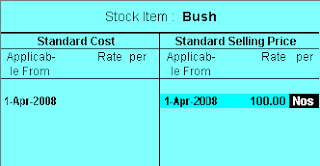
NAME: Bush
PARENT: Spares
UNIT: Nos
ALTER STANDARD COST/PRICE: Yes
Under the Standard Price, enter the following:-
Date: 01-04-2008
Rate: 100
STEP 2
Download the XML file which contains Standard Price data for 01-05-2008.
STEP 3
Now, try importing the Standard Price data from this XML file into Tally 7.2 and Tally 9.
For Tally 7.2, use Option "Gateway of Tally >> Import Masters"
For Tally 9, use Option "Gateway of Tally >> Import of Data >> Masters"
Notice, that the existing data for 01-04-2008 gets overwritten in Tally 9, whereas in Tally 7.2 it gets appended to the existing Standard Price data.
Preface
One of our Clients provided an Excel sheet that contained Stock-Item Masters with Standard-Price details (i.e. Standard Price Effective Date and Rate). The objective was to update the new PRICE-LIST in Tally 9.
Problem
On importing the Stock-Item Masters with Standard Price Date/Rate into Tally 9, the existing Standard-price data was overwritten.
On further analysis, we noticed :-
1) Tally 7.2 and Tally 9 behave/function differently when we import the Standard-Cost and Standard-Price data (into Stock-Item Master).
2) Tally 7.2 appends the Standard Cost / Price data to the existing Standard Cost/Price data.
3) Tally 9 overwrites the existing Standard Cost / Price data.
Here are the steps to check-out the same.
STEP 1
Create (manually create) a Stock-Item master in both Tally 7.2 and Tally 9. The details as given below:-

NAME: Bush
PARENT: Spares
UNIT: Nos
ALTER STANDARD COST/PRICE: Yes
Under the Standard Price, enter the following:-
Date: 01-04-2008
Rate: 100
STEP 2
Download the XML file which contains Standard Price data for 01-05-2008.
STEP 3
Now, try importing the Standard Price data from this XML file into Tally 7.2 and Tally 9.
For Tally 7.2, use Option "Gateway of Tally >> Import Masters"
For Tally 9, use Option "Gateway of Tally >> Import of Data >> Masters"
Notice, that the existing data for 01-04-2008 gets overwritten in Tally 9, whereas in Tally 7.2 it gets appended to the existing Standard Price data.
Monday, May 19, 2008
Tally 9 Release 2.12 - XML tags bug has been rectified
The bug in Tally 9 Release 2.1 relating to XML tags in proper-case issue has been rectified in Tally 9 Release 2.12.
In March 2008, we had noticed it and had put it up at this blog-site. For those who are not aware of it, can read it here.
Now, in Tally 9 Release 2.12 when we export Masters or Vouchers, the XML tags that are generated are in UPPER-CASE and this is in line with Older versions of Tally except for Tally 9 Release 2.1 wherein the XML tags were generated in Proper-case.
In March 2008, we had noticed it and had put it up at this blog-site. For those who are not aware of it, can read it here.
Now, in Tally 9 Release 2.12 when we export Masters or Vouchers, the XML tags that are generated are in UPPER-CASE and this is in line with Older versions of Tally except for Tally 9 Release 2.1 wherein the XML tags were generated in Proper-case.
Wednesday, April 9, 2008
Tally 9 vs Tally 7.2 XML tags
FAQs: Tally 9 XML tags
Can we use the Tally 7.2 XML tags with Tally 9 also ?
Yes. Most of the Tally 7.2 XML tags work with Tally 9, except for few minor changes required in certain cases.
We generally refer the Tally 7.2 tags format which can be used with both Tally 7.2 and Tally 9. However, there are certain cases wherein the tags differ and you need to use the appropriate tag. One of such cases is given underneath:-
UNIT Master XML tags (for Tally 7.2)
<UNIT NAME="Nos" RESERVEDNAME="">
<NAME>Nos</NAME>
<ORIGINALSYMBOL>Numbers</ORIGINALSYMBOL>
<ISSIMPLEUNIT>Yes</ISSIMPLEUNIT>
<DECIMALPLACES 2>/DECIMALPLACES>
<FORPAYROLL>No</FORPAYROLL>
</UNIT>
UNIT Master XML tags (for Tally 9)
<UNIT NAME="Nos" RESERVEDNAME="">
<NAME>Nos</NAME>
<ORIGINALNAME>Numbers</NAME>
<ISSIMPLEUNIT>Yes</ISSIMPLEUNIT>
<DECIMALPLACES 2>/DECIMALPLACES>
<FORPAYROLL>No</FORPAYROLL>
</UNIT>
Notice that the tag for "Formal Name" is ORIGINALSYMBOL in Tally 7.2 and ORIGINALNAME in Tally 9. A workaround is to use both the TAGs in your code which would then work with Tally 7.2 as well as Tall y9.
Can we use the Tally 7.2 XML tags with Tally 9 also ?
Yes. Most of the Tally 7.2 XML tags work with Tally 9, except for few minor changes required in certain cases.
We generally refer the Tally 7.2 tags format which can be used with both Tally 7.2 and Tally 9. However, there are certain cases wherein the tags differ and you need to use the appropriate tag. One of such cases is given underneath:-
UNIT Master XML tags (for Tally 7.2)
<UNIT NAME="Nos" RESERVEDNAME="">
<NAME>Nos</NAME>
<ORIGINALSYMBOL>Numbers</ORIGINALSYMBOL>
<ISSIMPLEUNIT>Yes</ISSIMPLEUNIT>
<DECIMALPLACES 2>/DECIMALPLACES>
<FORPAYROLL>No</FORPAYROLL>
</UNIT>
UNIT Master XML tags (for Tally 9)
<UNIT NAME="Nos" RESERVEDNAME="">
<NAME>Nos</NAME>
<ORIGINALNAME>Numbers</NAME>
<ISSIMPLEUNIT>Yes</ISSIMPLEUNIT>
<DECIMALPLACES 2>/DECIMALPLACES>
<FORPAYROLL>No</FORPAYROLL>
</UNIT>
Notice that the tag for "Formal Name" is ORIGINALSYMBOL in Tally 7.2 and ORIGINALNAME in Tally 9. A workaround is to use both the TAGs in your code which would then work with Tally 7.2 as well as Tall y9.
Saturday, April 5, 2008
Ignore Duplicates option does not work when two or more companies are opened
While working on this feature we noticed that the Ignore Duplicate option does NOT work when 2 (two) or more companies are open. It works only if a single Company is open. Let us try to understanding what we are talking about.
SITUATION 1
Step1
We created a Company name "Company A" and added 2 Ledger masters viz.
Ledger Name: Shweta Computers
Under Group: Sundry Debtors
Ledger Name: Tally Solutions
Under Group: Sundry Debtors
Step 2
Next, we exported the Ledger Masters using option "Display -> List of Accounts -> Alt+E" and selected option "Ledgers". This exported all the Ledger Masters into MASTER.XML file
Step 3
Next, we created another Company named "Company B"
Step 4
Next, we tried importing Masters data into "Company B" using the option "Gateway of Tally -> Import Masters". The other options were kept as given below:-
Import File Name: C:\tally\Master.xml
Treatment of entries already existing: Ignore Duplicates
Format : Tally XML format
RESULT - Situation 1
To our surprise, no Master was imported into "Company B"
SITUATION 2
We repeated the all the steps as mentioned in Situation 1, except for these changes in Step 2:-
Step 2
After exporting the Masters data from Company A, we closed that Company. i.e. "Company A". Rest of the steps were same as that given in Situation 1, and hence are not given here again.
RESULT - Situation 2
Two new Masters were imported into "Company B". viz
a) Shweta Computers
b) Tally Solutions
CONCLUSION
We tried using the Ignore Duplicate feature both manually and programmatically and found that it works when a single Company is open, but does not work if two or more Companies are open.
SITUATION 1
Step1
We created a Company name "Company A" and added 2 Ledger masters viz.
Ledger Name: Shweta Computers
Under Group: Sundry Debtors
Ledger Name: Tally Solutions
Under Group: Sundry Debtors
Step 2
Next, we exported the Ledger Masters using option "Display -> List of Accounts -> Alt+E" and selected option "Ledgers". This exported all the Ledger Masters into MASTER.XML file
Step 3
Next, we created another Company named "Company B"
Step 4
Next, we tried importing Masters data into "Company B" using the option "Gateway of Tally -> Import Masters". The other options were kept as given below:-
Import File Name: C:\tally\Master.xml
Treatment of entries already existing: Ignore Duplicates
Format : Tally XML format
RESULT - Situation 1
To our surprise, no Master was imported into "Company B"
SITUATION 2
We repeated the all the steps as mentioned in Situation 1, except for these changes in Step 2:-
Step 2
After exporting the Masters data from Company A, we closed that Company. i.e. "Company A". Rest of the steps were same as that given in Situation 1, and hence are not given here again.
RESULT - Situation 2
Two new Masters were imported into "Company B". viz
a) Shweta Computers
b) Tally Solutions
CONCLUSION
We tried using the Ignore Duplicate feature both manually and programmatically and found that it works when a single Company is open, but does not work if two or more Companies are open.
Friday, March 21, 2008
Tally 9 Release 2.1 - Error: No Valid Names!
Before we look into the cause and solution for the aforesaid Tally Error message, let's revisit Tally 9 Release 2.1 as there has been a major change in the XML tags which was discussed in my previous post also.
Here's what we are referring to:-
"When we export Vouchers or Masters data from Tally 9 Release 2.1, the XML tags that get generated are in proper-case whereas in the previous versions/releases the XML tags generated were in upper-case".
As XML tags are case-sensitive, the tags generated by Tally 9 Release 2.1 which are in proper-case like <Voucher> are not same as that generated by the previous versions of Tally which were in upper-case <VOUCHER>.
Given the above situation, we were trying to write XML tags that would work with all version of Tally. i.e. Tally 9 Release 2.1 and the older versions too.
We started with the Task of pushing (importing) data into Tally and choose Ledger Master to begin with. And here are the XML tags that we had written based on the Tally 9 Release 2.1 format.
XML tags for Ledger Master (Proper-case)
<ENVELOPE>
<HEADER>
<TALLYREQUEST<Import Data</TALLYREQUEST>
</HEADER>
<BODY>
<IMPORTDATA>
<REQUESTDESC>
<REPORTNAME<All Masters</REPORTNAME>
</REQUESTDESC>
<REQUESTDATA xmlns:UDF="TallyUDF">
<TALLYMESSAGE>
<Ledger NAME="ABC">
<Name.LIST>
<Name>ABC</Name>
</Name.LIST>
<Parent>Sundry Debtors</Parent>
</Ledger>
</TALLYMESSAGE>
</REQUESTDATA>
</IMPORTDATA>
</BODY>
</ENVELOPE>
Remarks:-
1) Notice that the XML tags within the <TALLYMESSAGE> are in proper-case whereas the other tags are in upper-case. We have written it this way as Tally 9 Release 2.1 generates tags in this style.
2) We had not included the <LanguageName.LIST> as this was not supported by Tally 7.2
Next, we used the above XML tags with different versions of Tally to create Ledger Master. And here's what we found.
Case 1: Using XML tags (written in proper-case) with Tally 9 Release 2.1
When we used the aforesaid XML tags (having proper-case) with Tally 9 Release 2.1, an error message was generated by Tally and no master-record was created in Tally. The error message was "No Valid Names!"
Case 2: Using XML tags (written in proper-case) with Tally 7.2
When we used the aforesaid XML tags (having proper-case) with Tally 7.2 Release 3.12, it worked fine and the Ledger master was created.
Next, we tried XML tags written in upper-case and here are our findings.
XML tags for Ledger Master (upper-case)
<ENVELOPE>
<HEADER>
<TALLYREQUEST<Import Data</TALLYREQUEST>
</HEADER>
<BODY>
<IMPORTDATA>
<REQUESTDESC>
<REPORTNAME<All Masters</REPORTNAME>
</REQUESTDESC>
<REQUESTDATA xmlns:UDF="TallyUDF">
<TALLYMESSAGE>
<LEDGER NAME="ABC">
<NAME.LIST>
<NAME>ABC</NAME>
</NAME.LIST>
<PARENT>Sundry Debtors</PARENT>
</LEDGER>
</TALLYMESSAGE>
</REQUESTDATA>
</IMPORTDATA>
</BODY>
</ENVELOPE>
We used the above XML tags (written in upper-case) with different versions of Tally to create Ledger Master. And here's what we found.
Case 1: Using XML tags (written in upper-case) with Tally 9 Release 2.1
It worked fine and Ledger master is created.
Case 2: Using XML tags (written in upper-case) with Tally 7.2 Release 3.12
It worked fine and Ledger master is created.
Surprising, though Tally 9 Release 2.1 generates XML tags in proper-case, but when we tried pushing data using XML tags written in same style (i.e. proper-case) it did not work. However, when we changed the XML tags to upper-case, it worked fine.
CONCLUSION
The test-experiments that we have done so far, suggest that we use XML tags in UPPER-CASE for pushing data into Tally, as this works with all the Tally versions including the latest Tally 9 Release 2.1
A BIG-RELIEF for those who have written programs for Tally Integration as these programs are likely NOT to be affected due to change in the Tally 9 Release 2.1 XML format. Also, note that all sample XML tags given at our site are in upper-case and hence will work with all versions of Tally software including Tally 9 Release 2.1
Of-course data conversion modules will (or may) be affected and may not function properly with Tally 9 Release 2.1 as mentioned in my previous post.
Here's what we are referring to:-
"When we export Vouchers or Masters data from Tally 9 Release 2.1, the XML tags that get generated are in proper-case whereas in the previous versions/releases the XML tags generated were in upper-case".
As XML tags are case-sensitive, the tags generated by Tally 9 Release 2.1 which are in proper-case like <Voucher> are not same as that generated by the previous versions of Tally which were in upper-case <VOUCHER>.
Given the above situation, we were trying to write XML tags that would work with all version of Tally. i.e. Tally 9 Release 2.1 and the older versions too.
We started with the Task of pushing (importing) data into Tally and choose Ledger Master to begin with. And here are the XML tags that we had written based on the Tally 9 Release 2.1 format.
XML tags for Ledger Master (Proper-case)
<ENVELOPE>
<HEADER>
<TALLYREQUEST<Import Data</TALLYREQUEST>
</HEADER>
<BODY>
<IMPORTDATA>
<REQUESTDESC>
<REPORTNAME<All Masters</REPORTNAME>
</REQUESTDESC>
<REQUESTDATA xmlns:UDF="TallyUDF">
<TALLYMESSAGE>
<Ledger NAME="ABC">
<Name.LIST>
<Name>ABC</Name>
</Name.LIST>
<Parent>Sundry Debtors</Parent>
</Ledger>
</TALLYMESSAGE>
</REQUESTDATA>
</IMPORTDATA>
</BODY>
</ENVELOPE>
Remarks:-
1) Notice that the XML tags within the <TALLYMESSAGE> are in proper-case whereas the other tags are in upper-case. We have written it this way as Tally 9 Release 2.1 generates tags in this style.
2) We had not included the <LanguageName.LIST> as this was not supported by Tally 7.2
Next, we used the above XML tags with different versions of Tally to create Ledger Master. And here's what we found.
Case 1: Using XML tags (written in proper-case) with Tally 9 Release 2.1
When we used the aforesaid XML tags (having proper-case) with Tally 9 Release 2.1, an error message was generated by Tally and no master-record was created in Tally. The error message was "No Valid Names!"
Case 2: Using XML tags (written in proper-case) with Tally 7.2
When we used the aforesaid XML tags (having proper-case) with Tally 7.2 Release 3.12, it worked fine and the Ledger master was created.
Next, we tried XML tags written in upper-case and here are our findings.
XML tags for Ledger Master (upper-case)
<ENVELOPE>
<HEADER>
<TALLYREQUEST<Import Data</TALLYREQUEST>
</HEADER>
<BODY>
<IMPORTDATA>
<REQUESTDESC>
<REPORTNAME<All Masters</REPORTNAME>
</REQUESTDESC>
<REQUESTDATA xmlns:UDF="TallyUDF">
<TALLYMESSAGE>
<LEDGER NAME="ABC">
<NAME.LIST>
<NAME>ABC</NAME>
</NAME.LIST>
<PARENT>Sundry Debtors</PARENT>
</LEDGER>
</TALLYMESSAGE>
</REQUESTDATA>
</IMPORTDATA>
</BODY>
</ENVELOPE>
We used the above XML tags (written in upper-case) with different versions of Tally to create Ledger Master. And here's what we found.
Case 1: Using XML tags (written in upper-case) with Tally 9 Release 2.1
It worked fine and Ledger master is created.
Case 2: Using XML tags (written in upper-case) with Tally 7.2 Release 3.12
It worked fine and Ledger master is created.
Surprising, though Tally 9 Release 2.1 generates XML tags in proper-case, but when we tried pushing data using XML tags written in same style (i.e. proper-case) it did not work. However, when we changed the XML tags to upper-case, it worked fine.
CONCLUSION
The test-experiments that we have done so far, suggest that we use XML tags in UPPER-CASE for pushing data into Tally, as this works with all the Tally versions including the latest Tally 9 Release 2.1
A BIG-RELIEF for those who have written programs for Tally Integration as these programs are likely NOT to be affected due to change in the Tally 9 Release 2.1 XML format. Also, note that all sample XML tags given at our site are in upper-case and hence will work with all versions of Tally software including Tally 9 Release 2.1
Of-course data conversion modules will (or may) be affected and may not function properly with Tally 9 Release 2.1 as mentioned in my previous post.
Thursday, March 20, 2008
Tally 9 Release 2.1 has a major BUG!!!
We have recently noticed a major issue with Tally 9 Release 2.1. Though this issue is NOT yet officially confirmed by Tally Solutions-Bangalore, it prima facie appears to be a BUG.
What is the BUG ?
This BUG relates to XML tags that are generated when data is exported from Tally 9 Release 2.1 either manually or programmatically. The XML tags names in Tally 9 Release 2.1 have been changed.
You can verify the same using the following option in Tally:-
Gateway of Tally -> Display -> Daybook -> Alt+E
Now, let's have an in-depth look at this issue. XML tags for both Tally 9 Release 2.1 and Release 2.0 have been provided underneath for your reference.
Tally 9 Release 2.1 exported XML Tags (extracts)
<Voucher REMOTEID="ea93b61d-be0a-4c3d-a725-55de09b86d37-00000001" VCHTYPE="Purchase" ACTION="Create">
<Date>20080331</Date>
<GUID>ea93b61d-be0a-4c3d-a725-55de09b86d37-00000001<GUID>
...other tags...
</Voucher>
Now, just look at the XML tags generated by Tally 9 Release 2.0 (or lower version)
<VOUCHER REMOTEID="ea93b61d-be0a-4c3d-a725-55de09b86d37-00000001" VCHTYPE="Purchase" ACTION="Create">
<DATE>20080331</DATE>
<GUID>ea93b61d-be0a-4c3d-a725-55de09b86d37-00000001<GUID>
...other tags...
</VOUCHER>
Noticed anything. No, not yet. No problem, just continue reading....
XML tags are case-sensitive
Yes. XML tags are case-sensitive. Notice that the Tags generated by Tally 9 Release 2.1 are in proper-case whereas in the previous Releases the XML tags were in upper-case. In simple words, <Voucher> is not the same as <VOUCHER>
Tally 9 Release 2.1 generates this :-
<Voucher>
Tally 9 Release 2.0 or previous version generates this:-
<VOUCHER>
Who all will be affected by this ?
End-users and programmers both who are using or have developed DATA transformation modules. Like converting Sales data of one Company as Purchase data for another Company.
There might be several other situations wherein this issue might create problems. One of such situations is given below.
Technical stuff for programmers
This will NOT work with Tally 9 Release 2.1 but works with previous Tally versions
SelectNodes('//VOUCHER')
This will work with Tally 9 Release 2.1 but will NOT work with previous Tally versions
SelectNodes('//Voucher')
Solution for this BUG
As the aforesaid BUG will affect some specific type of programs only, developers need to understand and analyze whether their programs would be affected in Tally 9 Release 2.1 or not. If your program is affected, then changes need to be done in your code/program.
Alternative 1
One solution for the above issue is to convert all nodes-names (XML-tag names) to upper-case and then do the processing. In other words, the XML-tags that are generated by Tally 9 Release 2.1 which are in proper-case need to be converted into upper-case, so that there is uniformity.
Alternative 2
Another alternative is to keep provision for both types of XML-tags (i.e. having XML-tags with proper-case and upper-case) in your programs.
The last and the easiest is to wait for Tally Solutions, Bangalore to fix this issue or advice your Client to use Tally 9 Release 2.0 (and not Release 2.1).
What is the BUG ?
This BUG relates to XML tags that are generated when data is exported from Tally 9 Release 2.1 either manually or programmatically. The XML tags names in Tally 9 Release 2.1 have been changed.
You can verify the same using the following option in Tally:-
Gateway of Tally -> Display -> Daybook -> Alt+E
Now, let's have an in-depth look at this issue. XML tags for both Tally 9 Release 2.1 and Release 2.0 have been provided underneath for your reference.
Tally 9 Release 2.1 exported XML Tags (extracts)
<Voucher REMOTEID="ea93b61d-be0a-4c3d-a725-55de09b86d37-00000001" VCHTYPE="Purchase" ACTION="Create">
<Date>20080331</Date>
<GUID>ea93b61d-be0a-4c3d-a725-55de09b86d37-00000001<GUID>
...other tags...
</Voucher>
Now, just look at the XML tags generated by Tally 9 Release 2.0 (or lower version)
<VOUCHER REMOTEID="ea93b61d-be0a-4c3d-a725-55de09b86d37-00000001" VCHTYPE="Purchase" ACTION="Create">
<DATE>20080331</DATE>
<GUID>ea93b61d-be0a-4c3d-a725-55de09b86d37-00000001<GUID>
...other tags...
</VOUCHER>
Noticed anything. No, not yet. No problem, just continue reading....
XML tags are case-sensitive
Yes. XML tags are case-sensitive. Notice that the Tags generated by Tally 9 Release 2.1 are in proper-case whereas in the previous Releases the XML tags were in upper-case. In simple words, <Voucher> is not the same as <VOUCHER>
Tally 9 Release 2.1 generates this :-
<Voucher>
Tally 9 Release 2.0 or previous version generates this:-
<VOUCHER>
Who all will be affected by this ?
End-users and programmers both who are using or have developed DATA transformation modules. Like converting Sales data of one Company as Purchase data for another Company.
There might be several other situations wherein this issue might create problems. One of such situations is given below.
Technical stuff for programmers
This will NOT work with Tally 9 Release 2.1 but works with previous Tally versions
SelectNodes('//VOUCHER')
This will work with Tally 9 Release 2.1 but will NOT work with previous Tally versions
SelectNodes('//Voucher')
Solution for this BUG
As the aforesaid BUG will affect some specific type of programs only, developers need to understand and analyze whether their programs would be affected in Tally 9 Release 2.1 or not. If your program is affected, then changes need to be done in your code/program.
Alternative 1
One solution for the above issue is to convert all nodes-names (XML-tag names) to upper-case and then do the processing. In other words, the XML-tags that are generated by Tally 9 Release 2.1 which are in proper-case need to be converted into upper-case, so that there is uniformity.
Alternative 2
Another alternative is to keep provision for both types of XML-tags (i.e. having XML-tags with proper-case and upper-case) in your programs.
The last and the easiest is to wait for Tally Solutions, Bangalore to fix this issue or advice your Client to use Tally 9 Release 2.0 (and not Release 2.1).
Monday, March 17, 2008
Tally Error : Proper Ref Name not given
Last week, while working on Tally XML tags, I got this error:-
<LINEERROR> xx: Proper Ref Name not given for 'xxx'!(FOR OBJECT: 'REMOTEID:xxx')</LINEERROR>
Though I could locate the mistake, it took few hours to do so. Here's what caused the problem.
"The tag <NAME> used within the <BILLALLOCATIONS> tag was blank. As the name suggests, the <BILLALLOCATIONS> tag is used to specify the Bill details viz Bill Number and Bill Amount.
The aforesaid tags are used when the feature "Bill-by-bill" is enabled for the given Party (Ledger account)
<LINEERROR> xx: Proper Ref Name not given for 'xxx'!(FOR OBJECT: 'REMOTEID:xxx')</LINEERROR>
Though I could locate the mistake, it took few hours to do so. Here's what caused the problem.
"The tag <NAME> used within the <BILLALLOCATIONS> tag was blank. As the name suggests, the <BILLALLOCATIONS> tag is used to specify the Bill details viz Bill Number and Bill Amount.
The aforesaid tags are used when the feature "Bill-by-bill" is enabled for the given Party (Ledger account)
Saturday, March 1, 2008
Tally Integration with Java
In the recent past, we have received several queries from Customers inquiring about whether the RTSLink DLL can be used in Java for Tally Integration.
In this respect, please note the following:-
1) RTSlink DLL cannot be used with Java.
2) However, Shweta Computers can provide customized solutions for Integrating Java Applications with Tally Software.
Please write to sales @ rtslink. com (remove spaces) for more information on integrating Java applications with Tally 9.
In this respect, please note the following:-
1) RTSlink DLL cannot be used with Java.
2) However, Shweta Computers can provide customized solutions for Integrating Java Applications with Tally Software.
Please write to sales @ rtslink. com (remove spaces) for more information on integrating Java applications with Tally 9.
Subscribe to:
Posts (Atom)