A blog on Tally Integration, to import and export data from Tally.ERP programmatically using VB6, VB.NET,C#,ASP.NET etc

Wednesday, November 12, 2008

EFFECTIVE DATE in Tally Software

FAQs: What is the usage of EFFECTIVE DATE in Tally

The HELP menu in Tally describes EFFECTIVE DATE. Refer topic Voucher-types which provides explanation for Effective Date. The same is given below for your reference.

Use EFFECTIVE dates for vouchers?

Select Yes if you want to enter effective dates for vouchers. You would opt for this if you have instances where a transaction under consideration for overdue/ageing analysis is recorded currently but will take effect from another date. If effective date is entered, the overdue/ageing will be considered from the effective date and not from voucher date.


Monday, September 22, 2008

Escape Sequences in XML, XSL

What is an Escape Sequence ?

"An Escape sequence is a series of characters which cause an escape from normal interpretation".

Escape sequences use a Special (Escape) character to change the meaning of characters that follow it.

For example, you cannot use the & (ampersand sign) in XML as you would normally use it elsewhere. The & (ampersand sign) is a special character and is to be used differently in XML.

This tag contains incorrect value.
<NAME>ABC & Company Ltd</NAME>

Here's the corrected tag.
<NAME>ABC &amp; Company Ltd</NAME>

XML Escape Sequences

In XML, there are 5 Escape sequences. Refer this link for more information on XML Escape sequences.

XSL Escape Sequences

XML Escape sequences are well documented and you can get lot's of information about it. But, what about using special characters in XSL ?

Well, the Escape sequences used in XML do NOT work in XSL. Now, let's try understand this.

Task 1
Search for all LEDGER nodes that have an attribute named NAME which contains "some-value".

This works fine.

//LEDGER[@NAME='some-value']

Task 2
Search for all LEDGER nodes that have an attribute named NAME which contains "Here's a special one".

This does not work :-

//LEDGER[@NAME="Here's a special one"]

This does not work :-

//LEDGER[@NAME='Here&apos;s a special one']

This WORKS!!!

//LEDGER[@NAME='Here\'s a special one']

Remarks:-
In Task 2, we search for a text-value that contains a special character ( ' ) .i.e. an apostrophe.


Friday, September 19, 2008

Tally Software || What is a Cancelled Voucher ?

Deleted voucher Vs Cancelled voucher

Deleting a Voucher

You can use Alt+D to manually delete a Voucher in Tally Software. When you delete a voucher, the Voucher and its effect is removed from the Tally Software.

Cancelling a Voucher

You can use Alt+X to manually cancel a Voucher in Tally Software. Cancelling a Voucher does not delete/remove the Voucher from Tally; but its effect is removed. In simple words, the Cancelled Voucher still appears in Tally; but it's effect is not reflected in Books of Accounts.

The XML tag <ISCANCELLED> is used to programmatically specify whether the Voucher is Cancelled or not.


Monday, September 15, 2008

Tally Group-Master XML tags contain Invalid unicode character

This prima-facie appears to be a BUG with Tally 9 and Tally 7.2

Steps to replicate the PROBLEM
1) Use the following SQL-SELECT to retrieve Tally data :-

Select $name , $parent from GROUPS

2) Extract of the XML-output generated by the above SQL-SELECT is given below for your reference:-

<ROW>
<COL>Branch / Divisions</COL>
<COL>&#4; Primary</COL>
</ROW>

Notice the line shown in RED color. It contains an invalid unicode character. When you load the data in XML DOM object, it does not work as there is an INVALID UNICODE CHARACTER.

This problems occurs even with Tally 7.2 which does not support UNICODE.


Thursday, August 28, 2008

Tally 9 Release 3 BETA issues

Tally Solutions, Bangalore has come out with a new Release of Tally Software. i.e. Tally 9 Release 3 Beta.

What is BETA Software?
Beta is a nickname for software which has passed the alpha testing stage of development and has been released to a limited amount of users for software testing before its official release.

Tally 9 Release 3 BETA
Some new and advanced features have been introduced in the Tally 9 Release 3 which relate to :-
a) Tally Synchronization
b) Accessing Tally data over Internet

The new features and functionality are applaudable. However, this is a BETA version and many problems have been reported with this new Release 3 BETA. As there are several issues; I am not putting up all the problems / issues here.

As a result we advice all our Customers (users of RTSlink DLL and UDIMagic software) to wait till Tally Solutions, Bangalore comes out with a stable Release.


Saturday, July 12, 2008

Programmatically create a Company in Tally

FAQs: Can I programmatically create a Company in Tally ?

No. This has been confirm by Tally Solutions, Bangalore. Maybe, in future this may be supported.

Sunday, June 29, 2008

Tally 9 bug - Importing Standard Cost / Price data

Recently, we noticed a problem while importing the Standard Price data into Tally 9. Though this issue is NOT yet officially confirmed by Tally Solutions-Bangalore, it prima facie appears to be a BUG with Tally 9.

Preface
One of our Clients provided an Excel sheet that contained Stock-Item Masters with Standard-Price details (i.e. Standard Price Effective Date and Rate). The objective was to update the new PRICE-LIST in Tally 9.

Problem
On importing the Stock-Item Masters with Standard Price Date/Rate into Tally 9, the existing Standard-price data was overwritten.

On further analysis, we noticed :-

1) Tally 7.2 and Tally 9 behave/function differently when we import the Standard-Cost and Standard-Price data (into Stock-Item Master).
2) Tally 7.2 appends the Standard Cost / Price data to the existing Standard Cost/Price data.
3) Tally 9 overwrites the existing Standard Cost / Price data.

Here are the steps to check-out the same.

STEP 1
Create (manually create) a Stock-Item master in both Tally 7.2 and Tally 9. The details as given below:-
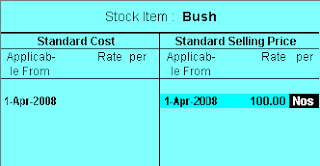
NAME: Bush
PARENT: Spares
UNIT: Nos
ALTER STANDARD COST/PRICE: Yes
Under the Standard Price, enter the following:-
Date: 01-04-2008
Rate: 100


STEP 2
Download the XML file which contains Standard Price data for 01-05-2008.

STEP 3
Now, try importing the Standard Price data from this XML file into Tally 7.2 and Tally 9.

For Tally 7.2, use Option "Gateway of Tally >> Import Masters"
For Tally 9, use Option "Gateway of Tally >> Import of Data >> Masters"

Notice, that the existing data for 01-04-2008 gets overwritten in Tally 9, whereas in Tally 7.2 it gets appended to the existing Standard Price data.


Monday, May 19, 2008

Tally 9 Release 2.12 - XML tags bug has been rectified

The bug in Tally 9 Release 2.1 relating to XML tags in proper-case issue has been rectified in Tally 9 Release 2.12.

In March 2008, we had noticed it and had put it up at this blog-site. For those who are not aware of it, can read it here.

Now, in Tally 9 Release 2.12 when we export Masters or Vouchers, the XML tags that are generated are in UPPER-CASE and this is in line with Older versions of Tally except for Tally 9 Release 2.1 wherein the XML tags were generated in Proper-case.

Wednesday, April 9, 2008

Tally 9 vs Tally 7.2 XML tags

FAQs: Tally 9 XML tags

Can we use the Tally 7.2 XML tags with Tally 9 also ?

Yes. Most of the Tally 7.2 XML tags work with Tally 9, except for few minor changes required in certain cases.

We generally refer the Tally 7.2 tags format which can be used with both Tally 7.2 and Tally 9. However, there are certain cases wherein the tags differ and you need to use the appropriate tag. One of such cases is given underneath:-

UNIT Master XML tags (for Tally 7.2)

<UNIT NAME="Nos" RESERVEDNAME="">
<NAME>Nos</NAME>
<ORIGINALSYMBOL>Numbers</ORIGINALSYMBOL>
<ISSIMPLEUNIT>Yes</ISSIMPLEUNIT>
<DECIMALPLACES 2>/DECIMALPLACES>
<FORPAYROLL>No</FORPAYROLL>
</UNIT>

UNIT Master XML tags (for Tally 9)

<UNIT NAME="Nos" RESERVEDNAME="">
<NAME>Nos</NAME>
<ORIGINALNAME>Numbers</NAME>
<ISSIMPLEUNIT>Yes</ISSIMPLEUNIT>
<DECIMALPLACES 2>/DECIMALPLACES>
<FORPAYROLL>No</FORPAYROLL>
</UNIT>

Notice that the tag for "Formal Name" is ORIGINALSYMBOL in Tally 7.2 and ORIGINALNAME in Tally 9. A workaround is to use both the TAGs in your code which would then work with Tally 7.2 as well as Tall y9.

Saturday, April 5, 2008

Ignore Duplicates option does not work when two or more companies are opened

While working on this feature we noticed that the Ignore Duplicate option does NOT work when 2 (two) or more companies are open. It works only if a single Company is open. Let us try to understanding what we are talking about.

SITUATION 1

Step1
We created a Company name "Company A" and added 2 Ledger masters viz.
Ledger Name: Shweta Computers
Under Group: Sundry Debtors
Ledger Name: Tally Solutions
Under Group: Sundry Debtors

Step 2
Next, we exported the Ledger Masters using option "Display -> List of Accounts -> Alt+E" and selected option "Ledgers". This exported all the Ledger Masters into MASTER.XML file

Step 3
Next, we created another Company named "Company B"

Step 4
Next, we tried importing Masters data into "Company B" using the option "Gateway of Tally -> Import Masters". The other options were kept as given below:-

Import File Name: C:\tally\Master.xml
Treatment of entries already existing: Ignore Duplicates
Format : Tally XML format

RESULT - Situation 1
To our surprise, no Master was imported into "Company B"

SITUATION 2
We repeated the all the steps as mentioned in Situation 1, except for these changes in Step 2:-

Step 2
After exporting the Masters data from Company A, we closed that Company. i.e. "Company A". Rest of the steps were same as that given in Situation 1, and hence are not given here again.

RESULT - Situation 2
Two new Masters were imported into "Company B". viz
a) Shweta Computers
b) Tally Solutions

CONCLUSION
We tried using the Ignore Duplicate feature both manually and programmatically and found that it works when a single Company is open, but does not work if two or more Companies are open.